Agent Host MCP
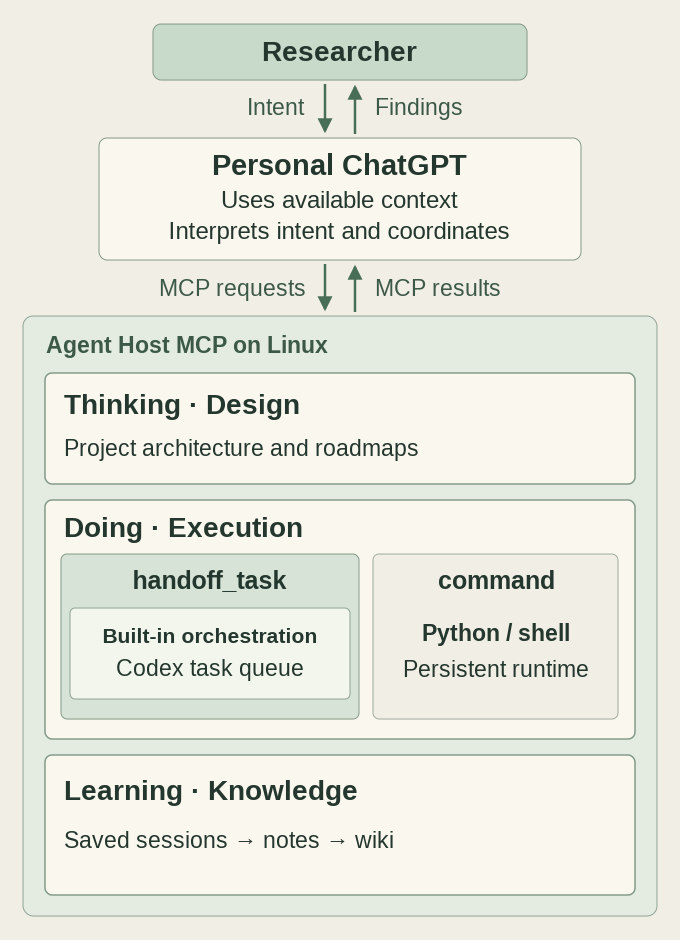
Use personal ChatGPT to clarify a research question and coordinate the work it calls for. Agent Host MCP connects that conversation to a Linux workspace where you can record design decisions, delegate Codex tasks, run experiments, and keep useful findings.
Three modules on one Linux host
- Conversational design
architecture_designandbuild_roadmapread and update project Markdown. Discussion produces intent and plans. Execution begins when the researcher asks for it.- Execution
handoff_taskdelegates a general objective (run) or implements a selected roadmap through task planning, tests, and review (coding). Its built-in queue enforces task dependencies and concurrency.command(action="execute")runs known Python or shell procedures in a separate persistent runtime.makeandupdate_makesupport repeatable project recipes.- Knowledge persistence
build_knowledgedistills saved session experience into reusable notes.wikiretrieves that material without another model turn, so it can inform the next design.
Install version 0.2.5
Use Linux, Python 3.11+, GNU Screen, and a separately installed, signed-in Codex CLI 0.167.1+ on the service account’s PATH. Wiki rendering also needs Git, Node.js 22.22.0+, and npm, with registry access on first use.
uv tool install 'agent-host-mcp==0.2.5'Create a private TOML config with the bind address, port, a random api_key, and the public HTTPS public_url. Bind to loopback when the TLS gateway runs on the same host. Run the server under a dedicated account with access limited to the intended projects.
chmod 600 config.toml
agent-host-mcp -f config.toml
Forward the MCP and OAuth routes through the gateway. In an eligible ChatGPT workspace, add the HTTPS /mcp URL as a custom MCP server and use OAuth with dynamic registration where configurable. Complete browser consent, install the plugin, and select it in the conversation. Use list_models to check the connection. The host token belongs on the consent page. ChatGPT custom MCP setup.
For APIs, read the tool catalog and ask for action-specific help with flag="-h". Use the returned ID and followup to inspect accepted work. Agent Host MCP 0.2.5 setup and tool reference.